Binary Arithmetic instructions
Decimal Arithmetic instructions
String and Character Translation Instructions
Instructions for BLockStructured Languages
Interrupt Description Table: Simplifying the Concept of Interrupts
Imagine you're in the middle of a conversation with a friend, discussing your plans for the weekend, when suddenly your phone rings. You pause your conversation to answer the call, then resume where you left off once the call is done. In the world of computers, a similar phenomenon occurs, known as an interrupt. Let's explore this concept further and simplify it using a description table.
Understanding Interrupts
hat are Interrupts?
Interrupts are signals sent by hardware or software to the processor, indicating that it needs immediate attention. Just like how a phone call interrupts a conversation, interrupts in computers temporarily pause the current task to handle a more urgent one.
Why are Interrupts Necessary?
Interrupts are essential for multitasking and handling real-time events in computer systems. They allow the processor to efficiently manage multiple tasks simultaneously without wasting time constantly checking for new events.
How do Interrupts Work?
When an interrupt occurs, the processor temporarily stops executing the current program, saves its state, and jumps to a predefined interrupt handler routine to address the interrupt. Once the interrupt is handled, the processor returns to the interrupted program and resumes its execution.
Interrupt Description Table
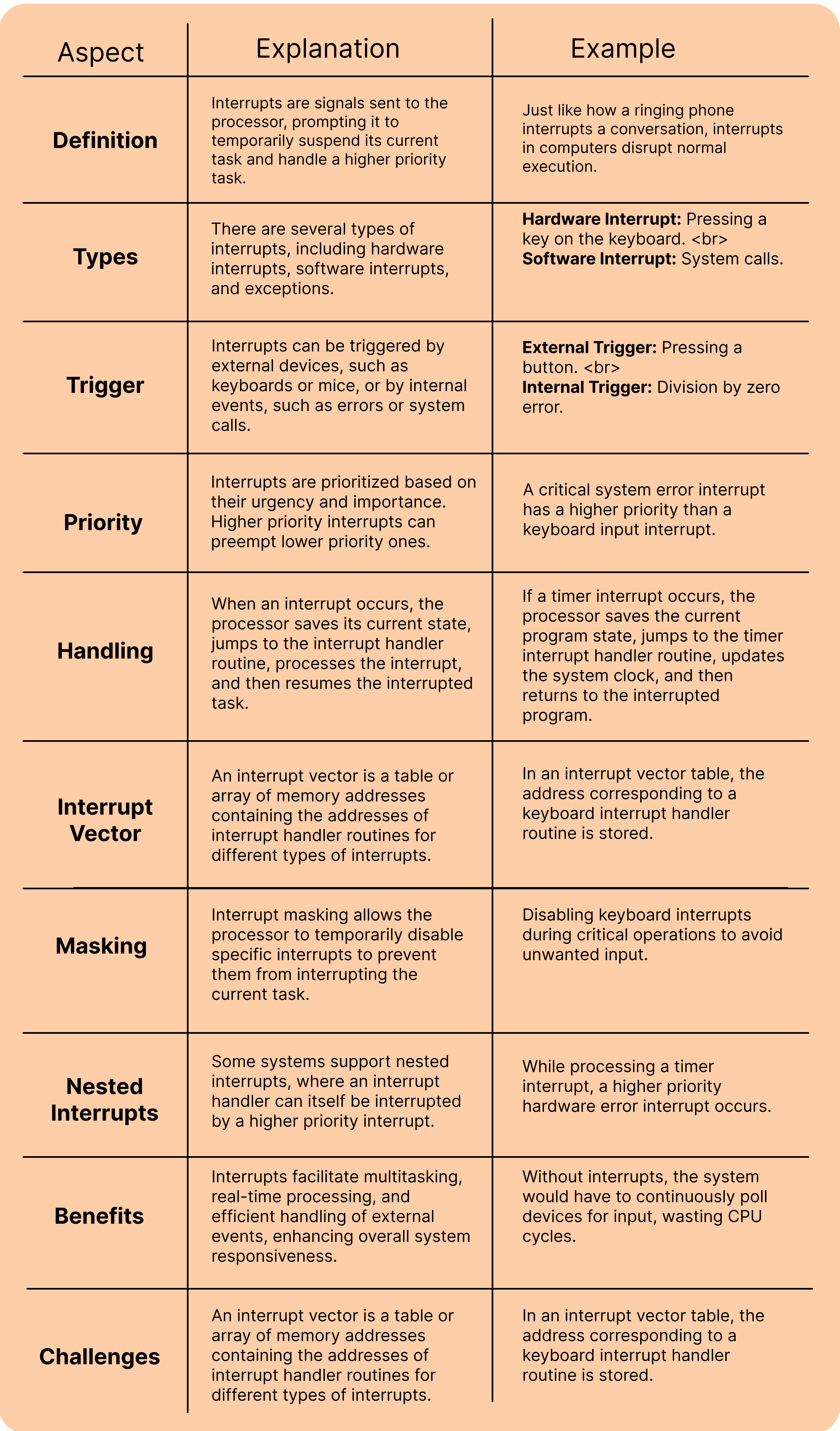
Examples and Analogies
1. Keyboard Interrupt:
2. Timer Interrupt:
3. Error Interrupt:
Real-World Applications
1. Operating Systems:
2. Embedded Systems:
3. Networking:
Conclusion:
Interrupts are like the traffic signals of the computer world, directing the flow of data and ensuring tasks are handled efficiently. By understanding interrupts and their role in computer systems, we gain insight into how computers multitask, respond to external events, and maintain system stability. Whether it's processing user input, managing hardware devices, or handling errors, interrupts play a vital role in the seamless operation of modern computing systems. So, the next time your computer pauses to handle a task, remember the silent yet powerful role of interrupts in making it all possible.
Interrupt Description Table
The Interrupt Descriptor Table (IDT) is like a directory for a computer's interruptions. It holds entries that map each interruption to its corresponding handler function, allowing the system to swiftly respond to external events like user input or hardware signals, ensuring smooth operation and efficient task handling.